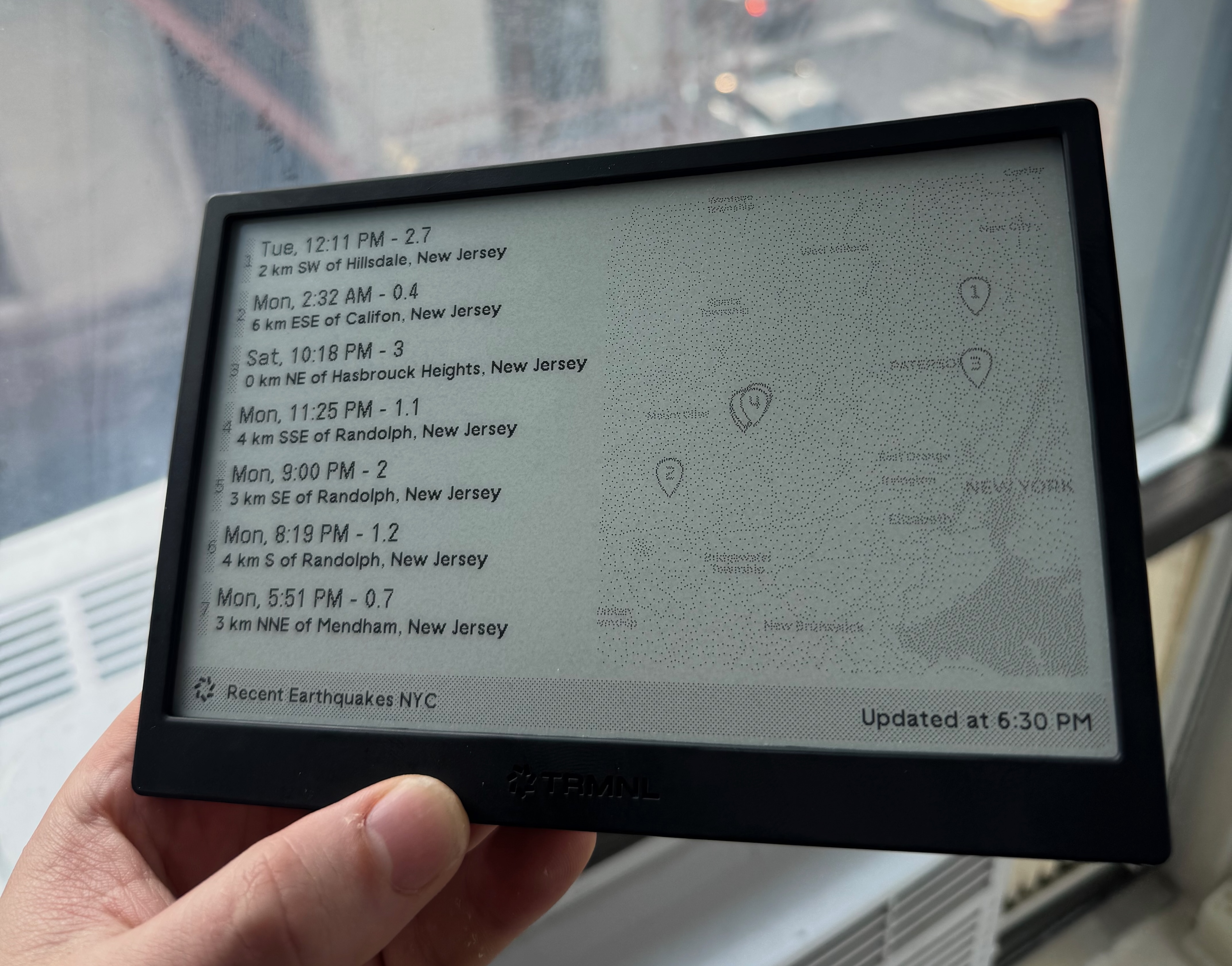
TRMNL Earthquake Recipe I’m having fun building TRMNL recipes! Here’s one that shows recent earthquakes (pulled from USGS’ public API) and plots them on a map.

TRMNL Earthquake Recipe I’m having fun building TRMNL recipes! Here’s one that shows recent earthquakes (pulled from USGS’ public API) and plots them on a map.

NYC Subway Alerts plugin for TRMNL Trmnl is proving to be the internet connected eink screen I always wanted to build but never wanted to maintain. It lives in my kitchen and predominantely shows my calendar but I decided to try building a recipe of my own. It was pretty easy and I’m pretty happy with the result!
Uploading an entire directory to the Internet Archive: I had a collection of files around ~50 GB in size that I wanted to upload to a single item in the Internet Archive directly from my NAS. There is a cli that could work but didn’t have a trivial way to upload all the files in a directory. I tried the S3-compatible endpoint with Cyberduck but that also didn’t work as expected.
I ended up running the Python library in a detached tmux session.
# In Bash:
python3 -m venv venv;
source venv/bin/activate;
pip install internetarchive;
# In Python:
from internetarchive import upload
upload(
'DESTINATION_ITEM_ON_INTERNET_ARCHIVE',
'LOCAL_FOLDER/',
# After creating an account you can ge the required keys here:
# https://archive.org/account/s3.php
access_key='YOUR_ACCESS_KEY',
secret_key='YOUR_SECRET_KEY'
)
Note: Remember, uploading things to the Internet Archive makes the email address associated with your account publicly visible

Geotagged videos of the L Train Brass Band in the Mermaid Parade My friend collected all of the YouTube videos that include the L Train Brass Band in the 2025 Coney Island Mermaid Parade and I’ve placed them on a map!
Clicking on any dot will bring up the relevant YouTube video at the timestamp the band goes by. It’s pretty crude at this point. I didn’t place the markers very carefully and some are stacked on top of each other. The green dot represents the start and the red dot the end.
This set up would work techincally for any other event but the Mermaid Parade is a little unique in a way that makes this easier. It’s a short parade and many people film it meaning there are many videos that include the entire parade. The scenery along the route is also very recognizable making manual geotagging easy.
Songs of Lehigh 1948-49 (vol 2) My quest to acquire and digitize all of the Lehigh University vinyl records continues.
This is now my second undated Lehigh vinyl. We could probably pin down the year by contacting the admissions department but it’s a good reminder to date your work!
Update, 2025: I found some info on a website called Worthpoint which seems to reproduce listings from online stores that indicates that this is disk two of a three disk set from 1948-49!
I’ve reproduced the reproduction here for future reference:
Excellent vintage condition. Some damage to the outer case binding and to one of the record sleeves (small split at bottom). Outer case has some scuffs and stains consistent with age of the item.
Set of three 10 inch 78 speed albums featuring the Lehigh Glee club dating to the late early 1950s. Packaged in a very nice bound book-style cover. Includes the following songs:
Side 1 - Campus Dreams, Spirit of Lehigh, Sunset in Bethlehem
Side 2 - Animals a’comin, Lehigh-Ho, Alma Mater
Side 3 - Hail to Lehigh, Victory March, Cheer for Alma Mater, Lehigh’s Loyal Sons
Side 4 - Beer Song
Side 5 - Boolia Boshka (featuring Moravian College for Women Singers)
Side 6 - This I Have Wanted to Hear (featuring Moravian College for Women Singers)
Whiteface Mountain and Mount Esther
Grandpa hiked Mount Marcy in 1955. After hiking Mount Marcy twice myself I recognized where one of the pictures was taken.


Marcy Dam was damaged by Hurricane Irene in 2011 and the dam has since been removed (Wikipedia).
The same view in 2019:
SSH to server via Tailscale if possible: If Tailscale is not running fall back to a different IP
Requirements:
Replace the following values:
{SERVER_NAME}: These configuration options will be used when you type ssh {SERVER_NAME}
{SERVER_USERNAME}: The username you use to connect to the server
{SERVER_TAILSCALE_IP}: IP Address or DNS name
{SERVER_NON_TAILSCALE_IP}: I said “IP” but “hostname” will also work here
{SERVER_PRIVATE_KEY_FILENAME}: Private key to log in with
# If Tailscale is running connect via this:
Match originalhost {SERVER_NAME} exec "[ $(/Applications/Tailscale.app/Contents/MacOS/Tailscale status --json | jq -r .BackendState) != Stopped ]"
HostName {SERVER_TAILSCALE_IP}
User {SERVER_USERNAME}
IdentityFile ~/.ssh/{SERVER_PRIVATE_KEY_FILENAME}
# If Tailscale is not running connect via this:
Host {SERVER_NAME}
HostName {SERVER_NON_TAILSCALE_IP}
User {SERVER_USERNAME}
IdentityFile ~/.ssh/{SERVER_PRIVATE_KEY_FILENAME}
Pops by the Lehigh University Band Another Lehigh vinyl acquired and now available on Archive.org. From discussion in the Marching 97 alumni band Facebook group we’ve learned the following:
Opening Signal Desktop Database on MacOS: I’ve seen some conflicting processes out there, here’s what worked for me in May, 2020:
Download and install DB Browser for SQLite but note that YOU MUST download the version specifically built with SQLCipher support. This version is not obviously available on their website, but you can find it in the nightly build folder here
When I tried to open the database with the default version of DB Browser it asked for a key or passphrase but it was never successful in decrypting the database. (This was what you might call infuriating)
You can find those builds here: nightlies.sqlitebrowser.org/latest
Open the folder in Finder by pressing Shift + Command ⌘ + g (or open the Window menu and click Go to Folder) and enter the following path:
/Users/{USERNAME}/Library/Application Support/Signal
Open the file config.json in your favorite text editor and copy the value of key, for if you saw the following you would copy A_VERY_LONG_STRING_OF_LETTERS_AND_NUMBERS without the quotation marks.
{
"window": null,
"key": "A_VERY_LONG_STRING_OF_LETTERS_AND_NUMBERS",
"mediaPermissions": true
}
Back in Finder open the folder sql
Open the file db.sqlite (by right clicking on the file and pressing open as, dragging the database to the application, etc.) in your newly installed version of DB Browser for SQLite.
Switch the decryption method from passphrase to raw key in the dropdown menu
Ensure that SQLCipher 4 Defaults is checked. SQLCipher 3 Defaults did not work for me.
Type 0x in the password box and then paste the key you copied from config.json.
0xA_VERY_LONG_STRING_OF_LETTERS_AND_NUMBERSOKYou should be in, the rest is up to you!